20 AI Apps You Can Vibe Code in a Weekend
Friday to Sunday: 20 real apps you can build with vibe coding. Habit trackers, meal planners, finance dashboards, each with a prompt and a time breakdown.
20 AI Apps You Can Vibe Code in a Weekend
Remember when building an app took months of planning, weeks of coding, and endless debugging sessions? Those days are over. Welcome to the era of vibe coding: you sketch an idea on Friday night and have a working app on your phone by Sunday evening.
We're not talking about toy projects. These are real, working apps you can publish to the App Store and Google Play. The secret? AI tools like Snapp that turn plain words into real iPhone and Android apps.
In this guide, we'll walk through 20 app ideas you can build in a single weekend. Each one includes the core features, a prompt to start from, and why it fits a weekend sprint.
What is Vibe Coding?
Vibe coding isn't just "AI helps you code." It's a different way of working:
Traditional Development: 1. Plan architecture for days 2. Write boilerplate code 3. Debug syntax errors 4. Style components manually 5. Fix state management bugs 6. Test on multiple devices 7. Deploy (and pray)
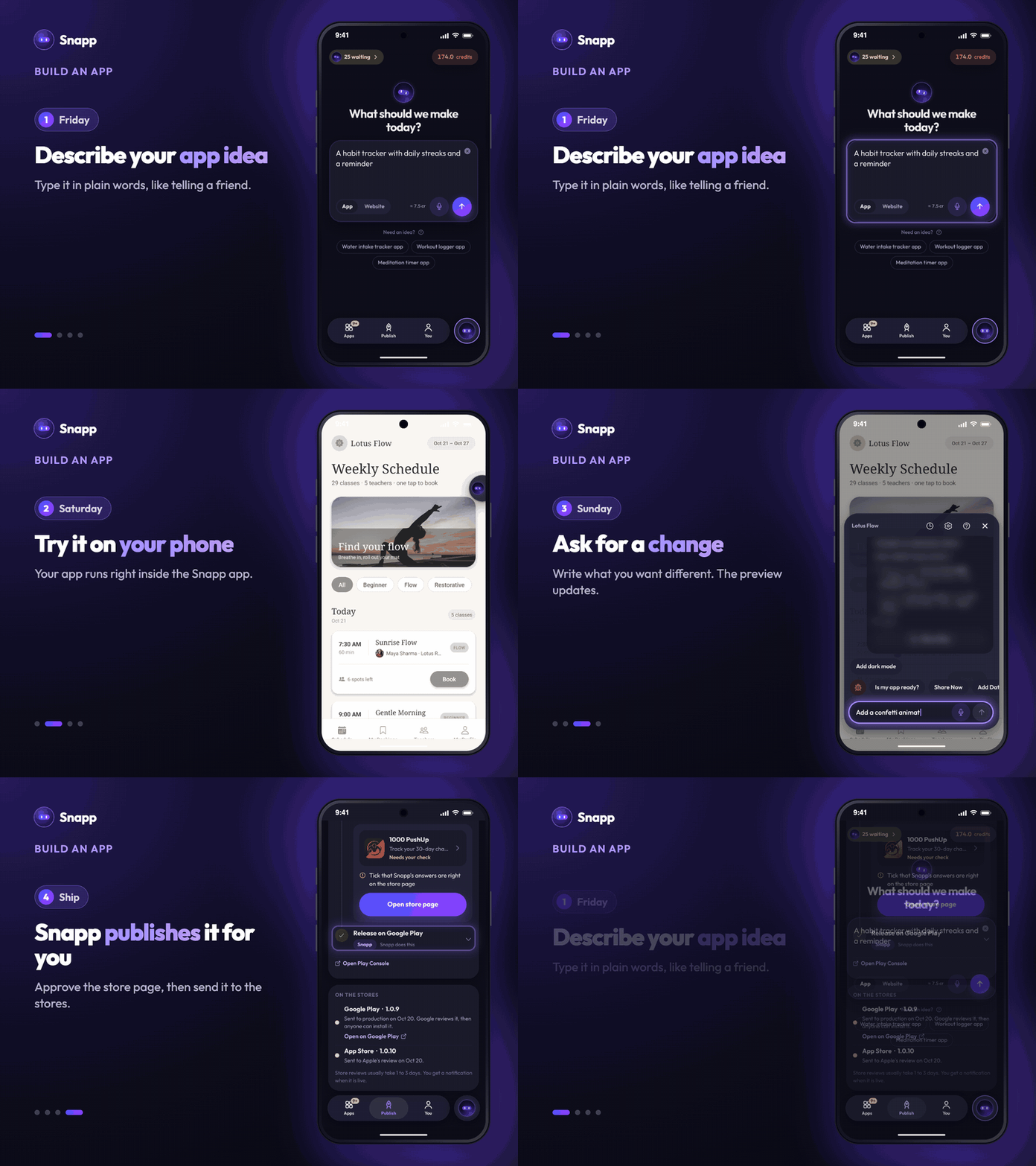
Vibe Coding: 1. Describe what you want in plain English 2. AI builds the whole feature 3. Try it on your phone right away 4. Ask for changes in the chat 5. Let Snapp publish it to the stores
The difference? Days become hours. Hours become minutes.
With Snapp, you're not just coding faster. You're thinking in products instead of functions, and building experiences instead of debugging.
The Weekend Builder's Toolkit
Before we dive into the 20 app ideas, here's what you need:
Required:
- A Snapp account (the free plan gives you free credits every day to try your idea; a paid plan gives you room to iterate all weekend)
- The Snapp app on your phone (on the App Store and Google Play)
- 2 to 3 hours of focused time per day
- Design inspiration (Dribbble, Behance)
- Your own photos to add in the chat
- You don't need an icon set: Snapp draws a logo for every new app, and you can change it in App name & icon
- Add Database: for apps that save data or share it between people (expense splitter, poll creator). Add it before you ask for features that save data.
- Add notifications: reminders that the user turns on in the app's settings.
- Add User Login: sign up and log in with email and password.
- Is my app ready?: a check of what still needs finishing before you publish.
- Start with the core feature first
- Test on your phone every 30 minutes
- Iterate based on what feels right
- Polish UI last, not first
- Ship imperfect > perfect never ships
- Daily habit checklist
- Visual streak counter
- Reminder notifications
- Progress charts
Optional but Helpful:
Four chat shortcuts you'll use all weekend:
The Vibe Coding Mindset:
Now let's build.
---
1. Habit Tracker with Streak Rewards
Core Features:
Vibe Coding Approach:
"Create a habit tracker app. Home screen shows today's habits as checkboxes.
Display current streak in big numbers at the top. Add a calendar view showing
completed days in green. Include a confetti animation when user completes all
daily habits."
Why It's Perfect for a Weekend: Simple data (just habits and completion dates), clear UI patterns, easy to test yourself.
Time Breakdown:
---
2. Local Coffee Shop Finder
Core Features:
Vibe Coding Approach:
"Build a coffee shop finder. Use device location to show nearby cafes on a map.
List view shows shop name, distance, and rating. Tap a shop to see details:
photos, hours, address. Add a heart icon to save favorites."
Why It's Perfect for a Weekend: Uses a public places service, proven UI patterns, personally useful. Add the service's API key in Environment first. Maps work in the Snapp preview, but a published Android app needs your own Google Maps key; Is my app ready? warns you if it's missing.
Time Breakdown:
---
3. Expense Splitter for Roommates
Core Features:
Vibe Coding Approach:
"Create an expense splitter. Add expense screen: amount, who paid, who should
split it. Home shows running totals for each person. Use green for owes you,
red for you owe. Add settle up screen showing who should pay whom."
Why It's Perfect for a Weekend: Clear math logic, solves a real pain point, easy to test with friends. If your roommates will use it on their own phones, tap Add Database first so everyone sees the same numbers.
Time Breakdown:
---
4. Workout Timer with Custom Intervals
Core Features:
Vibe Coding Approach:
"Build an interval timer for workouts. Let users create timers with work/rest
intervals. Big countdown shows seconds remaining. Screen flashes and beeps
between intervals. Show total time and current round number."
Why It's Perfect for a Weekend: Timer logic is straightforward, immediate personal use, satisfying to build.
Time Breakdown:
---
5. Recipe Keeper with Smart Search
Core Features:
Vibe Coding Approach:
"Create a recipe app. Save recipes with title, ingredients, and steps.
Search should find recipes by name or any ingredient. Cooking mode shows
one step at a time in big text. Add button to send all ingredients to
shopping list."
Why It's Perfect for a Weekend: A tool you'll actually use, clear data structure, several interesting features.
Time Breakdown:
---
6. Mood Journal with Analytics
Core Features:
Vibe Coding Approach:
"Build a mood tracker. Daily entry screen shows 5 face icons (very sad to
very happy). Add optional text notes. Calendar view shows mood color-coded
per day. Graph screen shows mood trends over time."
Why It's Perfect for a Weekend: Mental health matters, charts are rewarding to build, simple data model.
Time Breakdown:
---
7. Book Reading Tracker
Core Features:
Vibe Coding Approach:
"Create a reading tracker. Add books with title, author, total pages.
Track current page for books in progress. Show three shelves: reading,
finished, to-read. Display stats: books finished this year, pages read,
current reading streak."
Why It's Perfect for a Weekend: Perfect for book lovers, clear UI metaphors (shelves), motivating to use.
Time Breakdown:
---
8. Water Intake Reminder
Core Features:
Vibe Coding Approach:
"Build a water tracking app. Show a water bottle that fills up as you log
drinks. Quick add buttons for common amounts: glass (250ml), bottle (500ml),
large (1L). Send reminders every 2 hours if behind goal. Show weekly
completion rate."
Why It's Perfect for a Weekend: Health-focused, simple interaction model, instant visual feedback.
Time Breakdown:
---
9. Plant Care Manager
Core Features:
Vibe Coding Approach:
"Create a plant care app. Add plants with name, type, photo. Set watering
schedule (every X days). Home screen shows plants needing care today.
Mark as watered and it schedules next reminder. Keep history of all care
activities."
Why It's Perfect for a Weekend: Saves real plants, the reminder logic is a pattern you'll reuse, satisfying to keep up.
Time Breakdown:
---
10. Parking Spot Saver
Core Features:
Vibe Coding Approach:
"Build a parking spot saver. Big 'Save My Spot' button captures current
location and time. Show saved spot on map with walking directions. Set
optional timer for parking meter expiry. Send alert 10 minutes before
meter expires."
Why It's Perfect for a Weekend: Solves a frustrating real problem, uses location, immediately testable.
Time Breakdown:
---
11. Quick Voice Notes
Core Features:
Vibe Coding Approach:
"Create a voice notes app. Home screen has big record button. Start recording
immediately on tap, stop on second tap. Auto-transcribe using device speech
recognition. List shows all notes with transcription preview. Add tags for
organization."
Why It's Perfect for a Weekend: Uses the phone's own recording, minimal UI, powerful utility.
Time Breakdown:
---
12. Gratitude Journal
Core Features:
Vibe Coding Approach:
"Build a gratitude journal. Each day, show 3 text fields for things you're
grateful for. Optional photo attachment. Calendar view shows days with
entries in gold. Monthly review screen shows random past entries for
reflection."
Why It's Perfect for a Weekend: Positive mental health tool, simple data model, room for a beautiful UI.
Time Breakdown:
---
13. Tip Calculator with Split
Core Features:
Vibe Coding Approach:
"Create a tip calculator. Input bill amount, select tip % (15%, 18%, 20%,
custom). Show tip amount and total. Add number of people to split. Show
per-person amount in big numbers. Include round up to nearest dollar option."
Why It's Perfect for a Weekend: Pure utility, clear math, instantly useful at restaurants.
Time Breakdown:
---
14. Daily Affirmations
Core Features:
Vibe Coding Approach:
"Build an affirmations app. Show one random positive affirmation each day
with beautiful typography. Send morning notification with daily affirmation.
Users can heart favorites and add custom affirmations. Swipe for new random
affirmation."
Why It's Perfect for a Weekend: Wellness-focused, mostly UI and content work, good reminder practice.
Time Breakdown:
---
15. Countdown to Events
Core Features:
Vibe Coding Approach:
"Create an event countdown app. Add events with name, date, and optional
photo. Home screen shows all upcoming events sorted by date. Each card shows
days remaining in big numbers. Use color coding: green (far), yellow (soon),
red (urgent)."
Why It's Perfect for a Weekend: Date math practice, visually satisfying, personally motivating.
Time Breakdown:
---
16. Meal Planner for the Week
Core Features:
Vibe Coding Approach:
"Build a weekly meal planner. Show 7-day grid (breakfast, lunch, dinner).
Add meals to specific day/time slots. Each meal can link to a recipe.
Generate shopping list button extracts all ingredients from week's meals."
Why It's Perfect for a Weekend: Practical weekly tool, interesting UI challenge, connected data.
Time Breakdown:
---
17. Flashcard Study App
Core Features:
Vibe Coding Approach:
"Create a flashcard app. Users create decks with title and cards (front/back).
Study mode shows one card at a time - tap to flip. Swipe right if you know it,
left to study again. Track which cards need more practice."
Why It's Perfect for a Weekend: Great for students, swipe interactions are fun, built on learning science.
Time Breakdown:
---
18. Quick Poll Creator
Core Features:
Vibe Coding Approach:
"Build a polling app. Create poll with question and up to 10 options.
Generate shareable link. Anyone with link can vote once. Real-time results
show bar chart of votes per option. Poll creator can close voting."
Why It's Perfect for a Weekend: Social utility, real-time updates, fun to test. Votes from many phones need a shared place to live, so tap Add Database before you ask for voting.
Time Breakdown:
---
19. Personal Finance Dashboard
Core Features:
Vibe Coding Approach:
"Create a finance tracker. Add income/expense entries with amount, category,
and date. Home screen shows current month: total income, total expenses,
balance. Pie chart breaks down spending by category. Set monthly budget per
category."
Why It's Perfect for a Weekend: Immediate personal value, chart practice, financial awareness.
Time Breakdown:
---
20. Pet Activity Logger
Core Features:
Vibe Coding Approach:
"Build a pet care logger. Add pets with name, type, photo. Log activities:
walk (with duration), feeding (with food type), vet visit (with notes).
Home screen shows today's activities per pet. Set reminders for regular
activities like daily walks."
Why It's Perfect for a Weekend: Perfect for pet owners, photo practice, a caring daily routine.
Time Breakdown:
---
The Weekend Vibe Coding Blueprint
Now that you've seen 20 different apps, here's the blueprint for any weekend build:
Friday Night (1 hour)
1. Pick your app idea 2. Sketch the 3 core screens 3. List the must-have features (max 5) 4. Open Snapp and type your idea into What should we make today?Saturday Morning (2 hours)
1. Build the main screen 2. If the app saves data, tap Add Database now 3. Test on your phone 4. Iterate based on feelSaturday Afternoon (2 hours)
1. Add the second major feature 2. Connect the data flow 3. Test edge cases 4. Fix obvious bugsSunday Morning (2 hours)
1. Add the third feature 2. Add polish (animations, loading states) 3. Final testing 4. Tap Is my app ready? and fix what it findsSunday Afternoon (1 hour)
1. Real-world testing 2. Open the Publish tab and tap Build the app 3. Give Snapp access to your store account (once) 4. Check the store page Snapp prepares (text, screenshots, privacy policy), tap Approve, then releasePublishing to the stores needs a Starter plan or higher and your own Apple or Google developer account.
Total Time: about 8 hours over 2 days
Common Vibe Coding Patterns
After building several weekend apps, you'll notice recurring patterns:
List + Detail Pattern:
Daily Entry Pattern:
Timer/Counter Pattern:
Location-Based Pattern:
Social Sharing Pattern:
Vibe Coding Prompts That Work
The secret to fast vibe coding? Specific, visual prompts. Compare these:
Vague prompt: "Create a todo app"
Clear prompt: "Build a todo app. Home screen shows today's tasks as checkboxes with task text. Add button opens bottom sheet to enter new task. Completed tasks show with strikethrough. Swipe left on task to delete. Show count of completed/total at top."
Vague prompt: "Add a chart"
Clear prompt: "Add a bar chart showing last 7 days of activity. X-axis shows day labels (Mon, Tue, Wed...). Y-axis shows count from 0-10. Bars are blue, with rounded tops. Current day's bar is highlighted in darker blue."
The Formula: 1. Name the screen 2. Describe what the user sees 3. Specify the interaction 4. Define the data being shown 5. Mention any visual details that matter
Clear messages also cost fewer credits, because Snapp gets it right the first time.
Debugging Weekend Apps
When something doesn't work (it will), here's the weekend debugging strategy:
Step 1: Test on Your Phone First
Step 2: Report It With a Screenshot
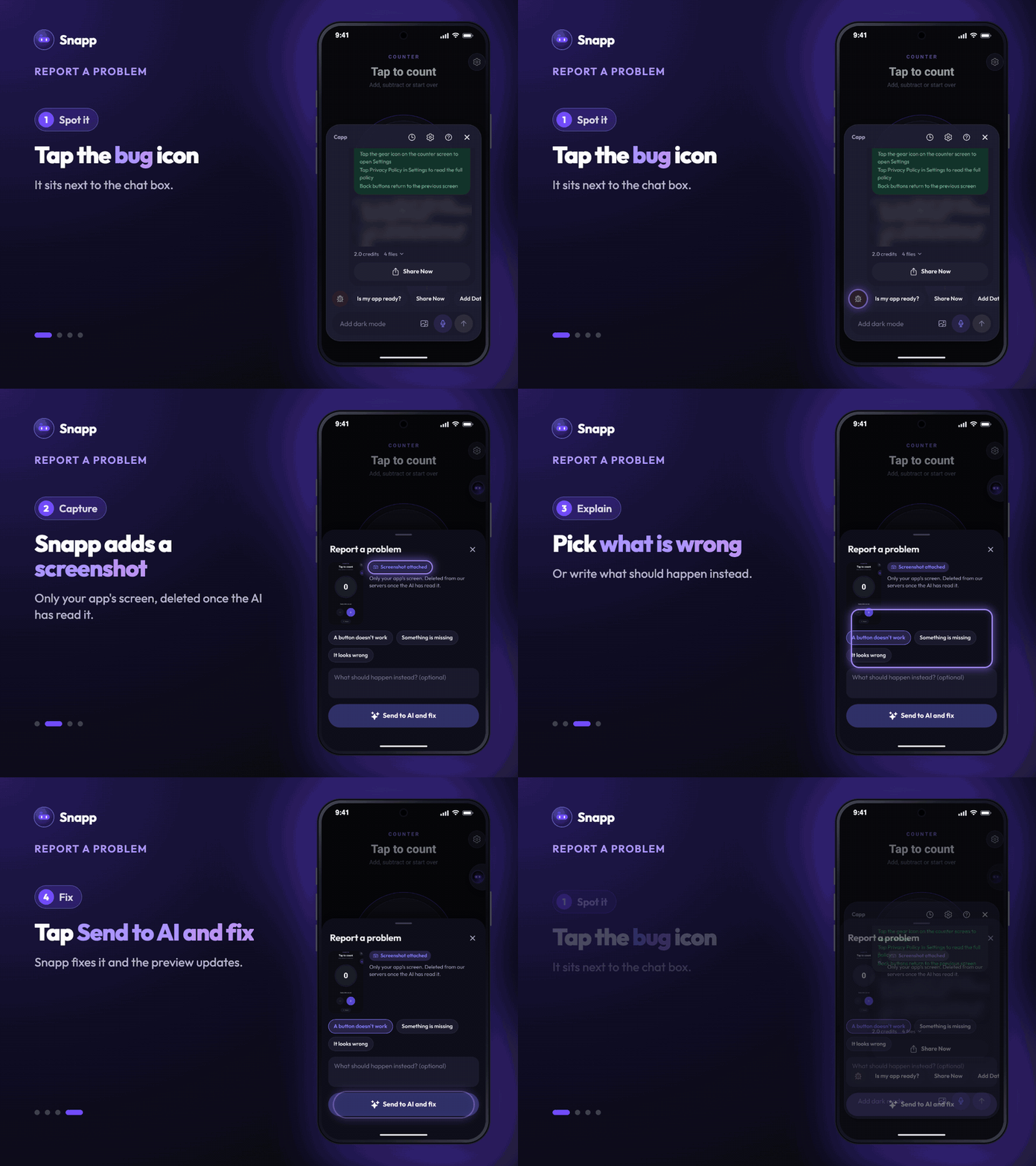
Tap the bug icon next to the chat box. Snapp attaches a screenshot of your app's screen, you pick what's wrong (A button doesn't work, Something is missing or It looks wrong) and tap Send to AI and fix.
Step 3: Describe the Problem Precisely Instead of: "The button doesn't work" Try: "When I tap the Save button, nothing happens. Expected: form should save and return to list screen"
Step 4: Iterate in Small Steps
Step 5: Show Debug Messages on Screen Ask Snapp: "Show a toast message before and after the save function runs so I can see it's being called"
Step 6: Simplify, Then Build Back Up
Went too far? Open History and restore an earlier version. Restoring is free.
Weekend Shipping Checklist
Before you call it done on Sunday evening:
Functionality:
User Experience:
Polish:
Store Prep (Snapp does most of it):
From Weekend Build to Real Product
Many good apps started as weekend projects. Here's how to grow yours:
Week 2: Real User Testing
Week 3: Analytics & Insights
Week 4: Polish & Marketing
Month 2: Monetization (Optional)
The Vibe Coding Mindset
The biggest difference between weekend builders who ship and those who don't? Mindset.
Weekend Builders Who Ship:
Weekend Builders Who Stall:
Remember: An imperfect app in the store beats a perfect app on your laptop.
Your First Weekend Build Starts Now
You now have:
The only question left: Which app will you build this weekend?
Pick one that excites you personally. One that you'd actually use. One that solves a problem you have right now.
Open Snapp. Type your idea. Write your first vibe coding prompt.
By Sunday evening, you'll have a working app on your phone.
By next week, it could be on its way to the App Store and Google Play. Store reviews usually take 1 to 3 days.
By next month, it could have real users.
The weekend starts now. Start building.
---
Ready to vibe code your first weekend app? Start building with Snapp. The free plan is enough to try your first idea.
SNAPP Team
Articles and content from the SNAPP team