How to Write a Prompt That Gets the App You Want
Every change uses credits, and a clear message usually gets it right the first time. Six habits that cut the back-and-forth: name the app type, one change per message, name the screen, describe the result, report problems with a screenshot, and add your database first.
How to Write a Prompt That Gets the App You Want
Every change you ask Snapp for uses credits. A clear message usually gets it right the first time; a vague one turns into three or four rounds of guessing. The difference is rarely effort. It's knowing what Snapp needs to hear.
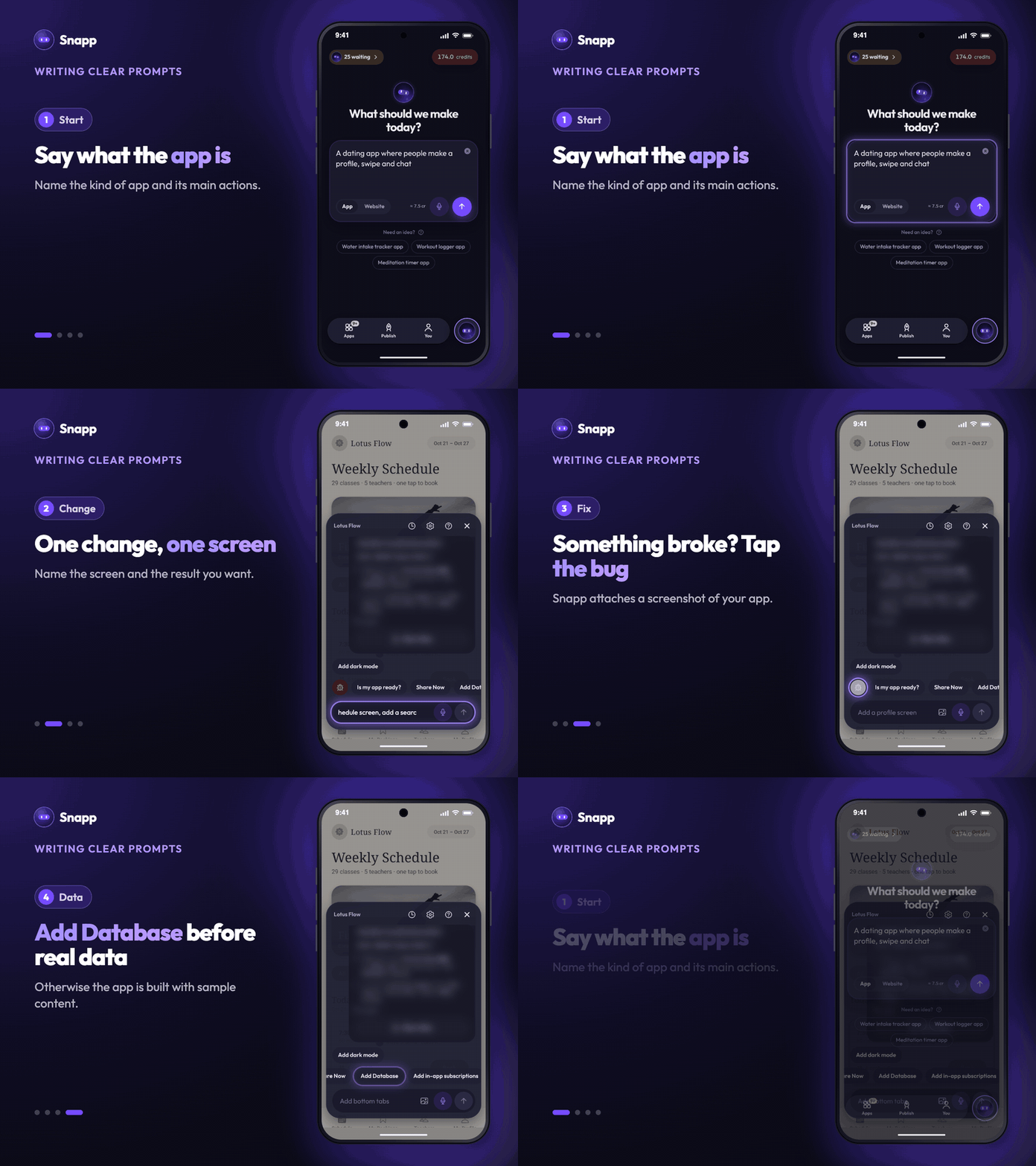
Here are six habits that save the most credits.
---
1. Say what the app is before what it should do
The most common reason Snapp stops to ask you a quick question is that it can't tell what kind of app you want.
Instead of: "Build me an app that lets people connect" Try: "Build a dating app where people create a profile, swipe through others, and chat when they match"
One sentence naming the kind of app and its three main actions is enough to start. You can refine everything else later.
2. One change per message
It's tempting to write a list. But when you ask for five things at once, Snapp has to pick what matters most, and it may guess wrong on at least one. You pay for the whole round.
Instead of: "Change the colors, add a filter, fix the login, and make the profile photo round" Try: "Make the profile photo round"
Small messages also cost less on their own, so a wrong one costs less.
Small wording or color tweaks don't need a message at all. Use Edit Text or Design in your app's settings (on Android, also the edit button next to the chat). They use no AI credits.
3. Name the screen
Snapp apps have screens. Saying which one removes almost all doubt.
Instead of: "Add a search bar" Try: "On the Explore screen, add a search bar at the top that filters the list by name"
4. Describe the result, not how to build it
You don't need to know how it's built. You do need to say what you should see when it works.
Instead of: "Use a useState hook to store the toggle" Try: "Add a switch in Settings that turns notifications off, and remember the choice when the app reopens"
If you're not a developer, this is good news: plain language beats half-remembered technical terms.
5. When something breaks, show and tell
"It doesn't work" forces Snapp to hunt. Three details usually get a fix in one round: where you were, what you did, and what happened.
Instead of: "Login is broken" Try: "On the login screen, I enter my email and password, tap Sign In, and nothing happens. The screen stays the same."
The fastest way to do this is Report a problem:
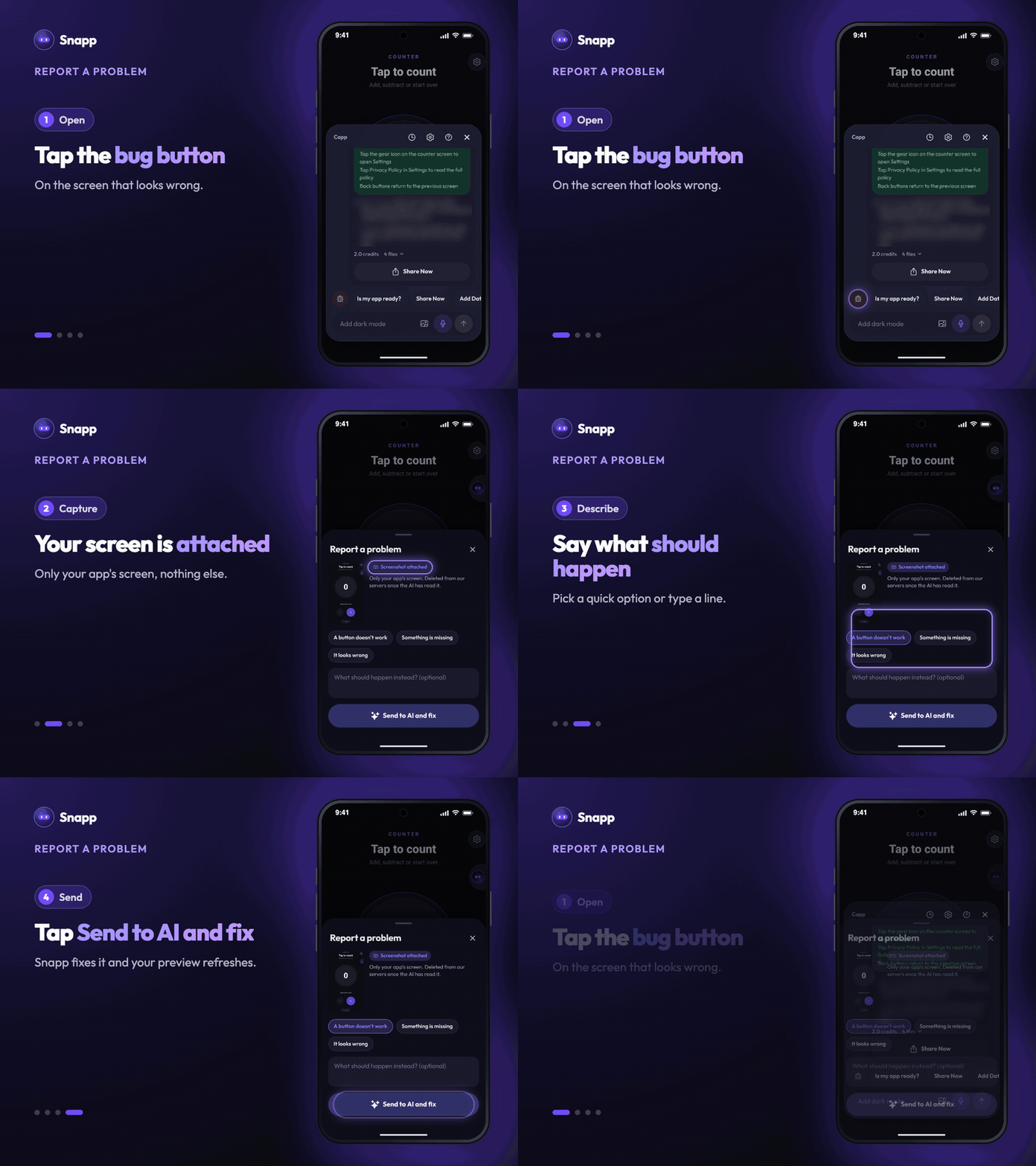
1. Open the screen that looks wrong and tap Ask to open the chat. 2. Tap the bug button, the first of the chat shortcuts. Snapp attaches a screenshot of your app. 3. Pick what fits, like A button doesn't work, Something is missing or It looks wrong, and add what should happen instead. 4. Tap Send to AI and fix.
6. Add your database before asking for real data
Until your app has a database, everything it shows is sample content. If you ask for "save the user's profile" before you add one, Snapp builds a demo version, and you pay again to rebuild it for real.
Tap Add Database in the chat shortcuts first, then ask for the features that store data. It's the biggest source of repeated work we see.
---
The 30-second checklist
Before you hit send, check that your message answers these:
- What kind of app is this? (first message only)
- Which screen does this change affect?
- What should I see when it's working?
- If something broke: what did you do, and what happened instead?
You don't need perfect English or any technical words. You need to be specific about the outcome. That's the whole skill, and it's worth learning early: it's the difference between building your app in ten messages instead of thirty.
Snapp Team
Articles and content from the SNAPP team