Add Stripe Payments and Supabase Auth to Your AI-Generated Apps
Add Supabase login and Stripe payments to the apps you build with Snapp. Connect your own accounts and own your users, data and revenue.

Add Stripe Payments and Supabase Auth to Your AI-Generated Apps
Building an app with AI is fast. Turning it into a real product, with people who sign in and a way to get paid, used to mean stitching together login services, payment code and a backend you don't want to look after.
With Snapp, you add Supabase login and Stripe payments to the apps you build by asking for them in the chat. You connect your own accounts, and Snapp builds the screens and the wiring.
Why this matters
The moment real people use your app, two questions come up:
1. How do they sign in? 2. How do you get paid?
With Supabase login and Stripe built into Snapp, you answer both without leaving the builder.
Supabase login: real users, in your control
Accounts are the foundation of most apps. When you add login, Snapp adds:
- Email and password sign-up and sign-in
- Forgot password, with the reset page already set up
- Sessions that keep users signed in
- The screens: sign in, sign up, sign out, wired into your app
- A checkout button that opens a payment page hosted by Stripe, so card details never touch your app
- One-time or recurring payments, depending on the link you create
- Several products, one Payment Link each
- Connect Supabase
- Add login and user accounts
- Accept payments with Stripe
Want Google or Apple sign-in too? Ask for it, then turn the provider on in your Supabase project. Our Google and Apple login guide shows the steps.
Your users live in your own Supabase project. You own the database, the user list and the keys. If you ever leave Snapp, your users and data stay with you.
Stripe: get paid for real-world goods and services
Connect your own Stripe account with a Payment Link, and Snapp adds:
Stripe is the right tool for physical goods and real-world services: orders, deliveries, bookings, tickets, classes, donations. Payments go to your Stripe account. Snapp doesn't sit in the middle of your money.
Selling something digital inside a mobile app, like a premium plan or coins? Apple and Google require their own in-app purchases for that. Tap Add in-app subscriptions in the chat instead.
Login + payments = a complete product
Together, the two cover a very common app model:
> People sign up, sign in, book or order, and pay.
A booking app for your studio. An order app for your bakery. A sign-up app for your events. You can build any of these with Snapp.
How to use it
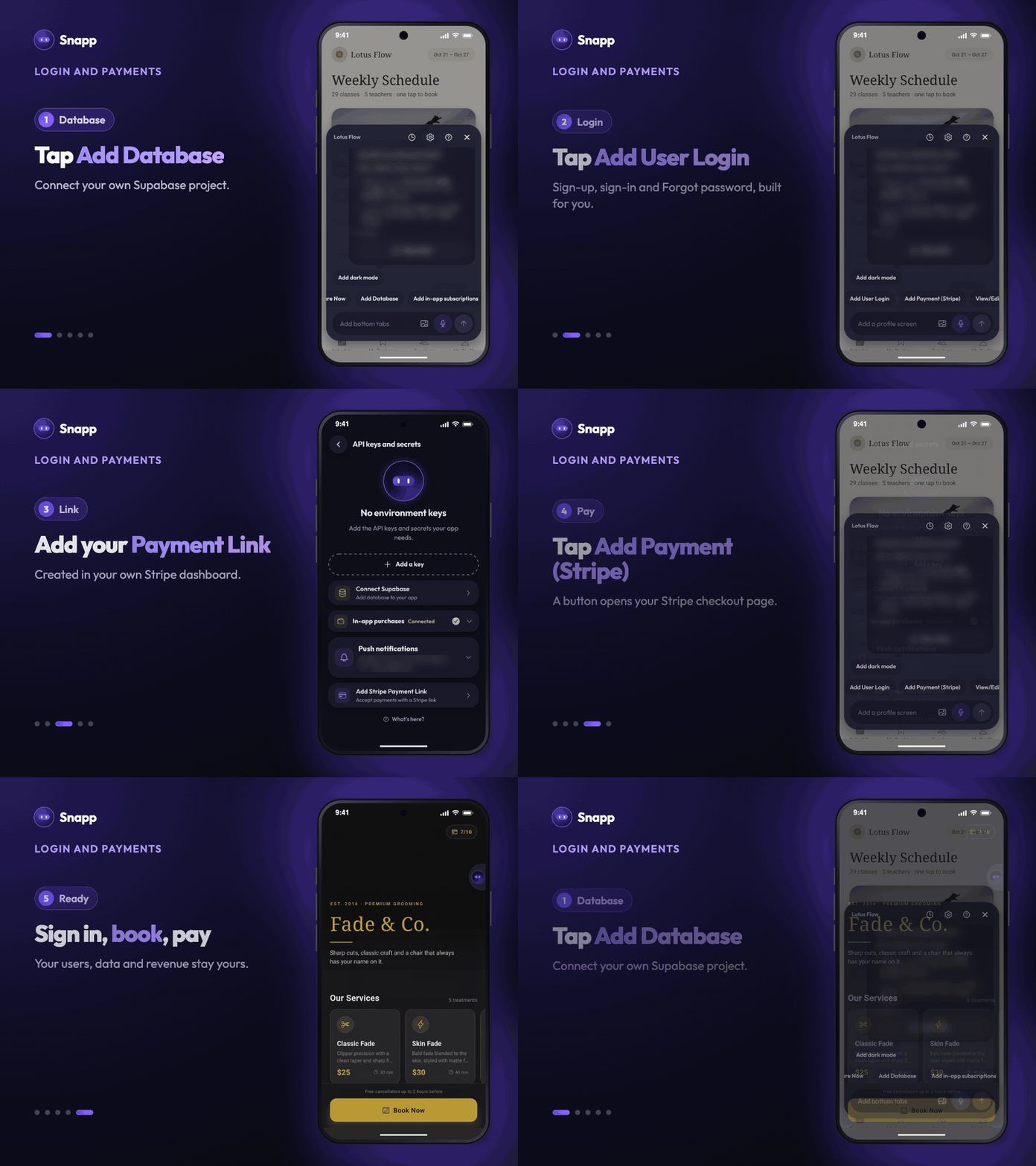
1. Open your app in Snapp, or start a new one. 2. Connect your database. Tap Add Database in the chat and connect your Supabase project. 3. Add login. Tap Add User Login in the chat and send the request. 4. Add payments. Create a Payment Link in Stripe, add it on your app's keys screen with Add Stripe Payment Link, then tap Add Payment (Stripe) in the chat. 5. Test it on your phone, then share or publish.
Your secret keys stay in Snapp Vault and never go inside your app.
Built for ownership, not lock-in
You bring your own Stripe account and your own Supabase project. Your users, your data and your revenue belong to you. Snapp's job is to remove the busywork between your idea and a working product.
Start building
Supabase login and Stripe payments are available in Snapp today. Step-by-step guides:
Have questions or want to show what you built? Join our community on WhatsApp. We'd love to see it.
The Snapp Team
---
Snapp Team
Articles and content from the SNAPP team