APK vs AAB: Getting Your Android App File
Building your Android app in Snapp asks for APK or AAB. Here is the simple difference and which one to pick for the store vs testing on a device.
APK vs AAB: Getting Your Android App File
When you build your Android app in Snapp, you pick a file type: APK or AAB. This short guide explains the difference so you choose the right one.
The quick answer
- AAB: for Google Play. It is the file the store needs.
- APK: for installing directly on a phone or sharing the file with someone. It cannot be sent to Google Play.
- Ready for the store? Publish your app to Google Play with Snapp
- Need a developer account first? Create a Google Play developer account
If you are publishing to the store, pick AAB. If you just want to try the app on your own Android phone, pick APK.
What is an APK?
An APK is a ready to install Android app file. You can send it to yourself, tap it on an Android phone, and it installs. No store needed. It is good for quick testing or for sharing a build with a teammate or client.
Because it installs outside the store, the phone may ask you to allow installs from unknown sources. That is normal for a file you built yourself.
What is an AAB?
An AAB (Android App Bundle) is the package Google Play uses. Google takes your AAB and makes the right version of the app for each phone. You cannot install an AAB directly on a phone. It is meant for the store.
How to build it in Snapp
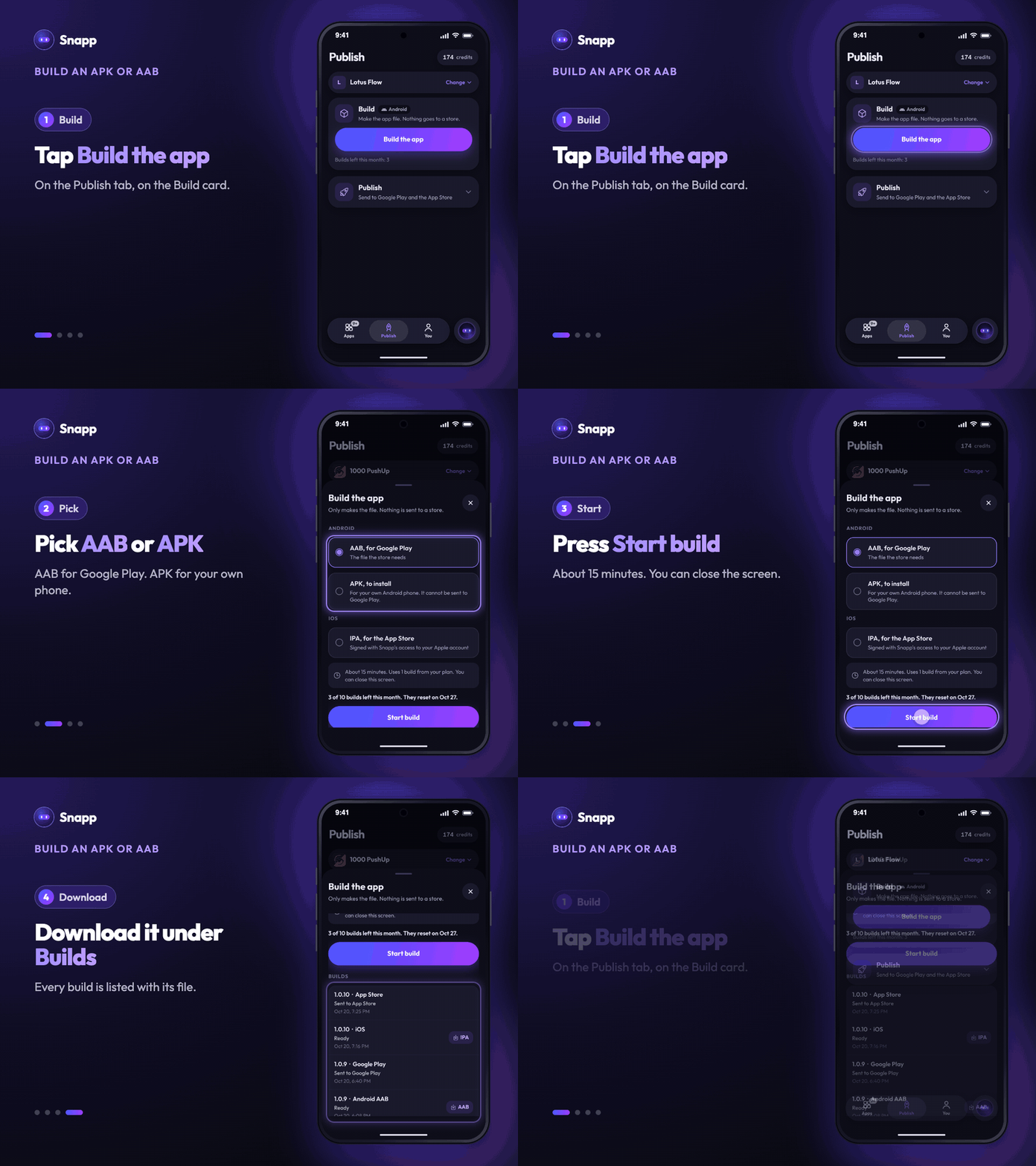
1. Open the Publish tab and pick your app. 2. Tap Build the app on the Build card. 3. Pick AAB, for Google Play or APK, to install, then press Start build and confirm. 4. It takes about 15 minutes. You can close the screen: you get a notification when it is ready. 5. Tap the Build card again. Every build is listed under Builds, with a download link for its file.
Each build uses one build from your plan. The Build card shows how many you have left this month. Building needs a paid plan (Starter or higher).
Which should I choose?
| Goal | Choose |
|---|---|
| Put the app on Google Play | AAB |
| Install on my own phone to test | APK |
| Send the app to a client or tester directly | APK |
| Let Snapp publish it to Google Play for me | AAB, then Release on Google Play on the Publish card |
What's next
Snapp Team
Articles and content from the SNAPP team