Is My App Ready? See exactly what’s left before you publish
Unfinished pages and dead buttons made people think their app was broken. The readiness report reads your app's code and shows what's left: a score, a list, and a free way to remove what you never wanted.
You open the app you just built, tap Settings, and land on a screen that says "Coming Soon." You tap a button on the profile page and nothing happens. Reasonable conclusion: something's broken.
It usually isn't. Those parts were never built, and nothing in your app told you that.
So we fixed the part that was actually wrong: the silence.
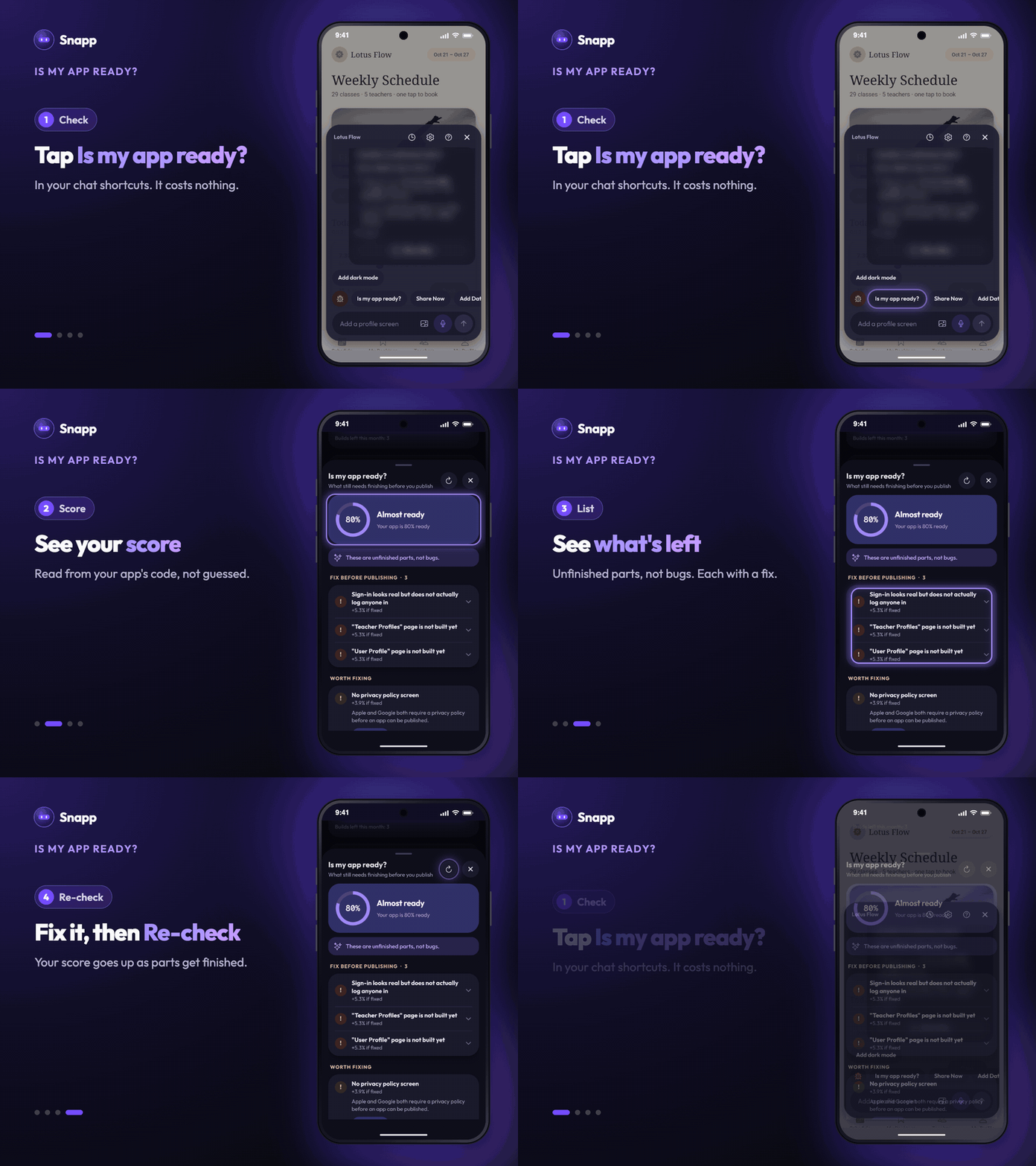
Meet "Is my app ready?"
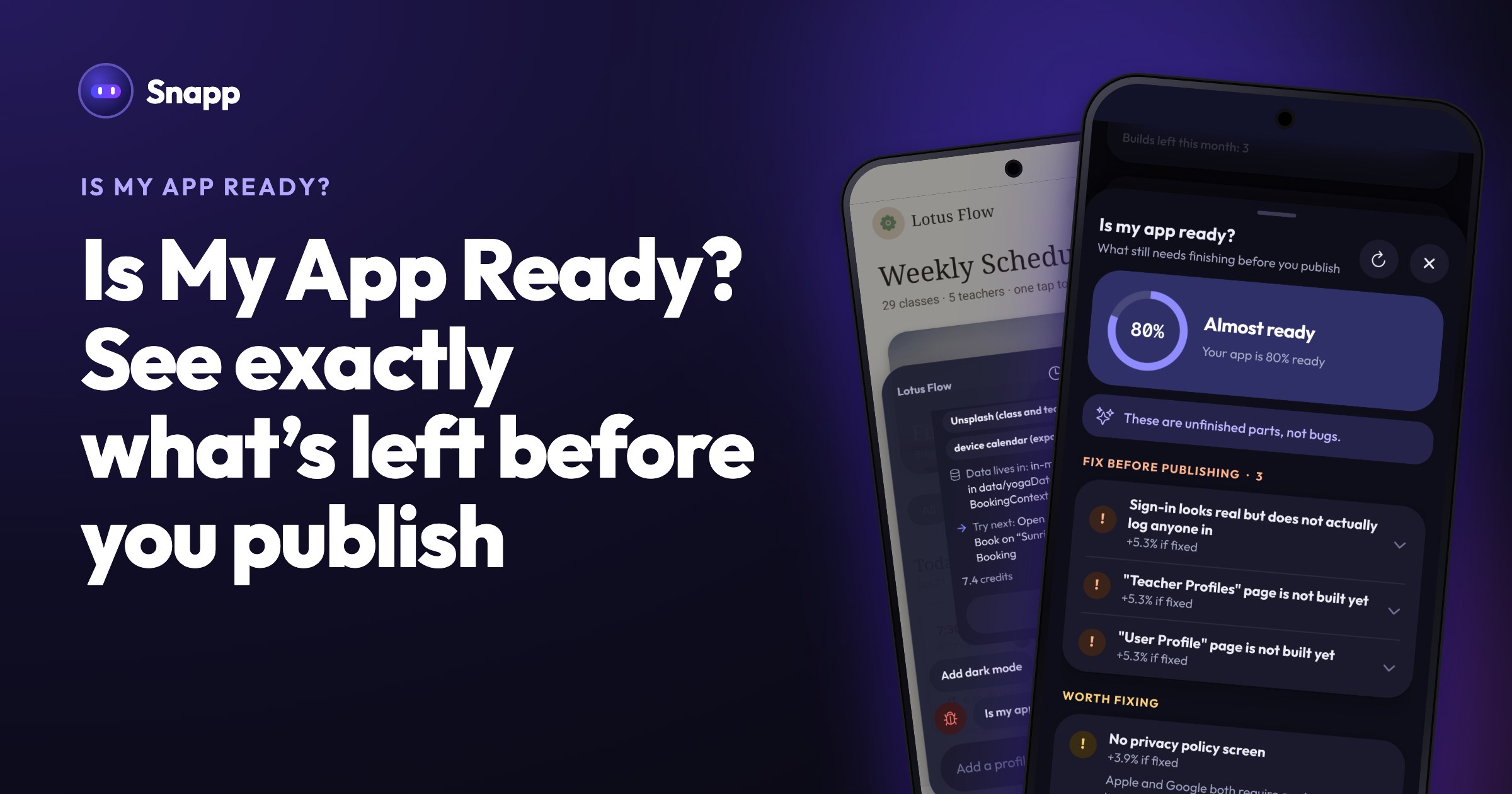
Is my app ready? is a shortcut in your chat (for websites it's called Is my site ready?). It gives you three things.
A score. "Your app is 76% ready", with your previous score next to it so you can see progress, and a label: Ready to publish, Almost ready or Not ready yet.
A list of what's left. Each item is named and tells you where it is: which page was planned but not built, which buttons do nothing, where placeholder text is still sitting, whether the data people type is really saved. Items are grouped into Fix before publishing, Worth fixing and Good to know, and items show how much your score goes up if you fix them.
Something you can do about each one. Build it, remove it, or open the setting that fixes it.
At the top of the list is one sentence: These are unfinished parts, not bugs. That sentence is the whole reason this feature exists.
Why your app has unfinished parts on purpose
The first build is deliberately a first version. Even if you write a long, detailed prompt, Snapp builds the core of your main flow properly and leaves the rest as planned placeholders.
That's a trade-off we chose: three screens built well beats twenty built badly. The mistake was never telling you which was which.
The score doesn't come from AI
This was the decision we thought hardest about, because asking the AI would have been the easy path.
We don't ask it. The score comes from reading your app's actual code. Three reasons that matters:
The same code always gives the same score. Ask an AI "how ready is my app?" and you can get a different number each time, and a number you can't trust.
It costs nothing. Open the report as often as you like.
It can't make things up. The AI can't report a missing page as done, or a finished page as missing, because it has no say in the score.
Here's why that's not theoretical. While building this, we hit an app whose plan marked the Profile page as complete. The real code had seven buttons wired to nothing. Trusting the plan would have said "ready." Reading the code said "seven buttons do nothing when tapped."
Removing something is free
The most common item you'll see is a page that was planned but never built. Some of them you never asked for.
So those pages get two options: Build it or Remove from app.
Removing is completely free and uses no AI. The page is deleted, taken out of your app's navigation and your plan, and the buttons that led to it are cleaned up too. You shouldn't have to spend credits on a page you didn't want. Your score goes up right away.
One safeguard: if the page is still used by another screen, the removal doesn't happen, and we tell you where it's used. Every removal is also checked first: if your app wouldn't build afterwards, nothing changes.
What it checks
- Pages that were planned but never built, and screens nothing in your app links to
- Buttons with nothing behind them, and links pointing at pages that don't exist
- Files with a mistake that stops your app from opening at all
- Leftover sample content like lorem ipsum and
you@example.com - Whether data is really saved, and whether sign-in really signs anyone in
- Payment forms that ask for a card but aren't connected to any payment service
- A map in your app with no map key for the Android version
- Store requirements: app icon and privacy policy
- Publishing. On the Publish tab, step 1 is Get your app ready. Its App check line shows how many things are left to fix and opens this report. You can still publish, but apps with unfinished pages are often rejected by the App Store under "minimum functionality". Finding out before you submit is a lot cheaper than after.
- The community gallery. When you turn on Publish to gallery and something is unfinished, you see Check before you share first. Fix it, or tap Share anyway.
The scoring is fair to small apps: things your app doesn't have can't hurt your score. No payment screen means no penalty for "payments not set up." We didn't want a simple counter app to look 40% finished.
Before you publish or share
Two places now use the report for you:
Neither one blocks you. It's your call.
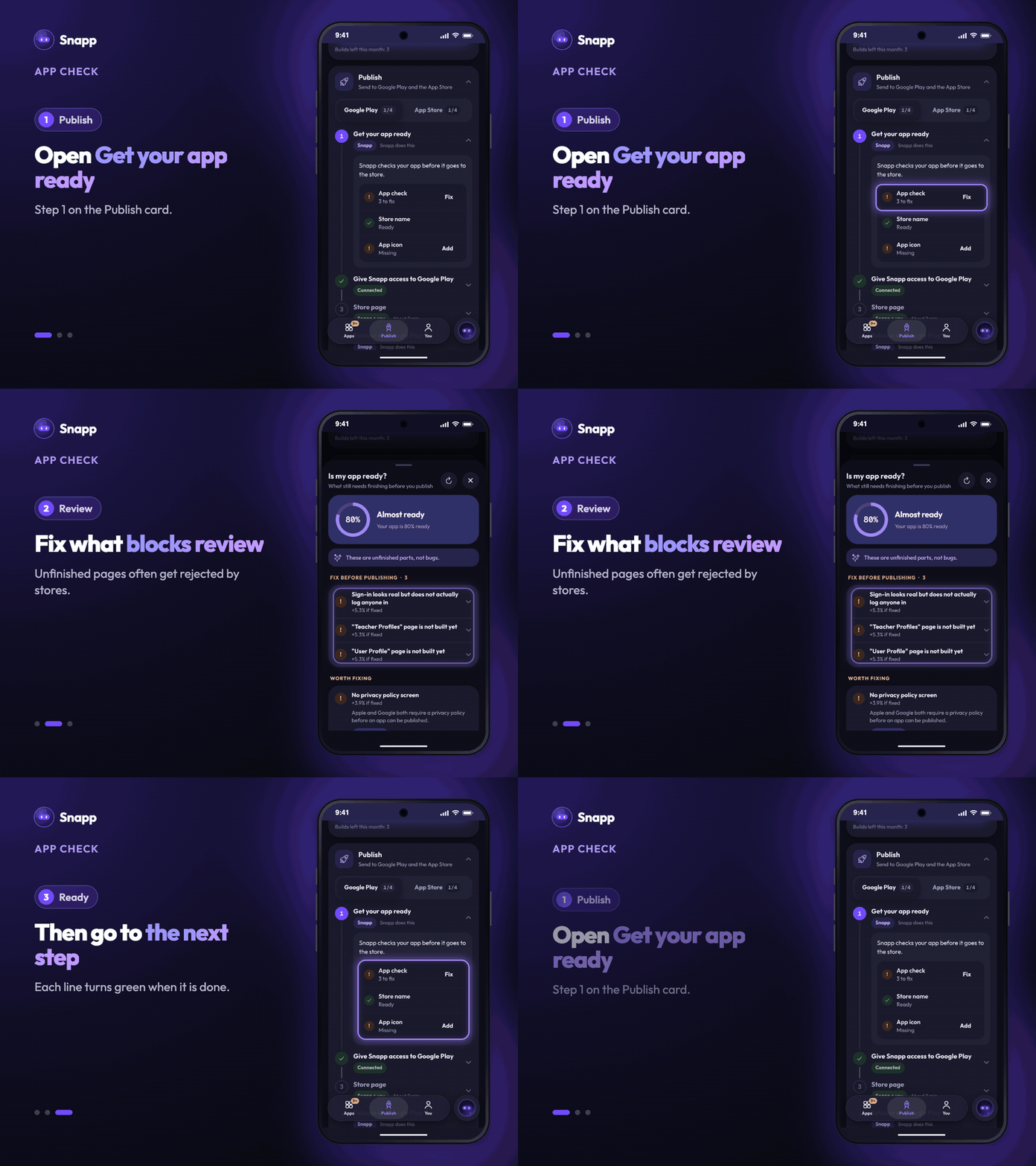
Where to find it
Tap Is my app ready? in your chat shortcuts. On the web, it's also in App Options. The report updates after every change Snapp makes, and there's a Re-check button if you want to run it again yourself.
Games don't use this report. Snapp checks a game by playing it while it builds.
Shipping an app is harder than starting one. At least now you can see what's left.
Savas
Articles and content from the SNAPP team